

What Is YouTube Automation? How to Make Money with YouTube Automation in 2026 (Complete Beginner Guide)
December 29, 2025 | by mk75089317@gmail.com

Get Hosting at 20% Discount
https://hostinger.in?REFERRALCODE=CM8MK7508CRS
Learn YouTube Automation in 2026 and build faceless channels that earn money passively. Step-by-step guide for beginners to start and monetize faster.
Introduction: The Dream of Earning Money While You Sleep
What if you could run a successful YouTube channel without ever showing your face, recording your own voice, or spending hours editing videos? What if you could build a stream of income that grows even when you’re not actively working?
This isn’t a fantasy—it’s the reality of YouTube Automation, one of the most sought-after online business models for 2025. Imagine managing a popular channel about fascinating facts, personal finance, or gaming highlights where your main job is strategy and supervision, not production.
In this complete YouTube automation guide, we’ll strip away the hype and give you a clear, actionable roadmap. Whether you’re a complete beginner or someone who’s burned out from traditional content creation, you’ll learn exactly how to make money with YouTube automation in 2025. Let’s dive in.
What Is YouTube Automation? (No Hype, Just Facts)
YouTube Automation is the process of creating and managing a YouTube channel by systemizing or outsourcing the core content creation tasks—like scripting, video editing, voiceover, and thumbnail design. The channel owner acts as a creative director and project manager, focusing on strategy, optimization, and growth, rather than being the on-camera talent or hands-on editor.
The most common format is the faceless YouTube channel, which uses stock footage, animations, text-on-screen, and a voiceover to deliver engaging content without a personal host.
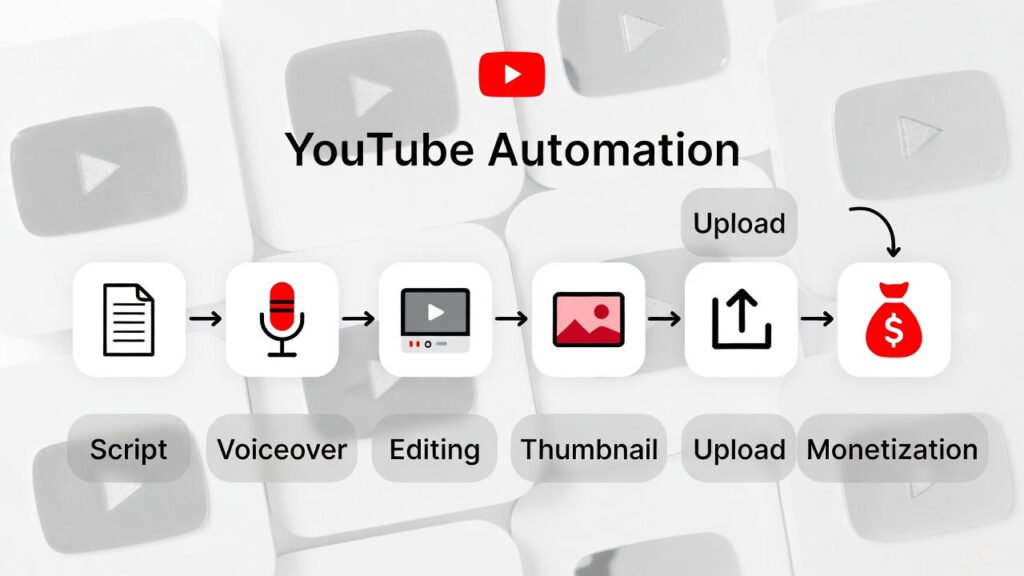
How Does It Actually Work? The Simple Breakdown:
- You (The Manager): Choose the niche, research keywords, plan the content calendar, and oversee quality.
- Your System/Tools/Team: Handles the production. A script is written, a voiceover (often AI) is generated, footage is compiled and edited, and a thumbnail is designed.
- The Output: A polished, upload-ready video is published to your channel consistently.
- The Result: Views generate revenue through ads, affiliates, and other monetization methods, creating passive income.
It’s a legitimate business model built on efficiency and scale, not a “get-rich-quick” scheme. It leverages tools and talent to bypass the traditional barriers of content creation.
https://support.google.com/adsense
The Pros, Cons, and Real Earning Potential
Before you invest time and money, let’s weigh the reality.
The Benefits (Why It’s So Popular):
- Scalability: Once your workflow is set, you can increase video output or even manage multiple channels.
- Leverage: You’re not limited by your own skills. You can hire experts for writing, editing, and design.
- Privacy: Perfect for those who don’t want to be public figures (the faceless YouTube channel advantage).
- Time Freedom: After the initial setup, maintenance requires far fewer hours per video than DIY creation.
- Passive Income Stream: Older videos can continue to attract views and earn money for years.
The Challenges & Cons:
- Initial Investment: Quality requires some upfront cost for tools, software, and outsourcing. Expect to invest $500-$2000 to start professionally.
- Finding Reliable Talent: Vetting and managing freelancers for scripting or editing has a learning curve.
- YouTube Policy Navigation: Your channel must provide genuine value and follow community guidelines. Low-effort, copied, or spammy content risks demonetization or bans.
- Competition: As the model grows, standing out requires better strategy and quality, not just automation.
Realistic Earning Potential in 2026
Managing expectations is crucial. Income varies wildly based on niche, quality, and consistency.
- Starting Out (Months 1-6): Often $0 – $200 per month. This is the building phase.
- Growth Phase (Months 6-12): A channel gaining traction can earn $500 – $3,000 per month.
- Established Channel (1+ Years): Successful automated channels can generate $3,000 – $20,000+ per month.
Key Metric: RPM (Revenue Per Mille) is what you earn per 1,000 views. In profitable niches like personal finance, tech, or business, RPMs can range from $10 to $50+. In broader niches like entertainment, it might be $2-$10.

Your 2026 Step-by-Step Guide to Starting YouTube Automation
Step 1: Niche Selection & Validation
Your niche is your foundation. A good niche has high audience interest, decent RPM, and room for you to compete.
- Strategy: Combine something you’re interested in with proven profitability. Use tools like TubeBuddy or vidIQ to analyze channels in your potential niche. Look for consistent uploads, good view counts, and engagement.
- Action: Write down 3 potential niches and find 10 successful channels in each. Study their most popular videos.
Step 2: Content Strategy & Keyword Research
You can’t rank if you don’t know what people are searching for.
- Find Keywords: Use YouTube’s search suggest (type your niche + “a,” “how to,” etc.). Tools like Ahrefs or VidIQ show search volume and competition.
- Content Pillars: Organize your channel into 3-5 broad topics. For a “Personal Finance” channel, pillars could be: Investing Basics, Side Hustles, Debt Management, and Frugal Living.
- Create a Bank of Ideas: Build a spreadsheet with at least 100 video ideas derived from your keyword research.
Step 3: The “Golden Triangle” of Production: Script, Voice, Edit
This is the core of your automated workflow.
1. Scriptwriting:
- DIY: Learn copywriting for YouTube. Hooks in the first 5 seconds, clear structure, and a CTA are key.
- Outsource: Use platforms like Upwork or Fiverr to find YouTube scriptwriters. Provide detailed briefs.
- AI Tools: ChatGPT (GPT-4) or Claude are phenomenal. Use prompts like: “Write a 1,200-word YouTube script in a conversational tone about ‘10 Beginner Investing Mistakes to Avoid in 2026.’ Include a hook, timestamps, and a call to subscribe.”
2. Voiceover:
- AI Voice Tools (The Game-Changer): Human-like AI voices have revolutionized automation.
- ElevenLabs: The industry leader for quality and natural emotion.
- Play.ht and Murf.ai: Excellent alternatives with many voices and languages.
- Human Voiceovers: For ultimate quality, hire on Fiverr or Voices.com.
3. Video Editing & B-Roll:
- Stock Footage Sites: Storyblocks, Artgrid, Pexels, Pixabay.
- Editing Software & AI:
- For Beginners: Canva (surprisingly powerful for simple edits), InVideo.
- For Advanced/Outsourcing: Adobe Premiere Pro, DaVinci Resolve.
- AI Editing Tools: Runway ML, Synthesia (for AI avatars), Pictory (turns scripts into videos).
Step 4: Thumbnail & Title Mastery
This is your ad. Most clicks happen here.
- Thumbnail Design:
- Tools: Canva (templates), Adobe Photoshop, Snappa.
- Principles: High contrast, readable text (3 words max), a human face or element showing emotion, and vibrant colors.
- Title Crafting: Use power words (Ultimate, Secret, 2026), create curiosity or promise a clear benefit, and include your main keyword.
Step 5: Upload & Optimize for YouTube SEO
Publishing isn’t just hitting upload.
- Title: Include main keyword, keep it under 60 characters.
- Description: First 2-3 sentences should hook and describe the video. Include keywords naturally. Add timestamps and links.
- Tags: Use a mix of broad and specific keywords (5-8 total).
- Custom Thumbnail: Always upload a custom, branded thumbnail.
- Playlists: Group related videos together to increase watch time.
Step 6: Monetization & Scaling
- YouTube Partner Program (AdSense): Requires 1,000 subscribers and 4,000 watch hours in the past year. Once achieved, ads run on your videos.
- Affiliate Marketing: Promote products (Amazon, Coursera, software tools) and earn a commission on sales. Often more lucrative than ads.
- Sponsorships: Brands pay for dedicated product mentions. Rates vary by channel size.
- Scaling: Reinvest your earnings into better talent, more video output, or starting a second channel in a related niche.
Profitable Faceless YouTube Channel Niches for 2026
Here are evergreen and trending ideas with high RPM potential:
- Personal Finance & Make Money Online: “Side Hustles for 2025,” “Index Fund Investing Explained.”
- Technology & AI News: “Weekly AI Tool Roundup,” “Smart Home Setups.”
- Health & Wellness (Animation/Stock Footage Based): “Meditation Guides,” “Science of Sleep.”
- Gaming News & Highlights: “Game Patch Breakdowns,” “E-Sports Recap.”
- Mystery & Documentary: “Unsolved Historical Mysteries,” “Space Exploration Facts.”
- Motivational & Educational Compilations: “Inspiring Speeches,” “How It’s Made-Style Animations.”
- Reddit Story Narrations: “True Stories from r/Confessions,” “AITA Dramas.”
How to Outsource Your YouTube Automation Workflow
Your role evolves from creator to manager.
- Start with One Role: Begin by outsourcing your biggest bottleneck (usually editing or scripting).
- Platforms:
- Upwork: Best for finding dedicated, long-term freelancers.
- Fiverr: Great for one-off, standardized gigs (e.g., one thumbnail, one voiceover).
- OnlineJobs.ph: For hiring full-time virtual assistants from the Philippines at competitive rates.
- Hiring Tips: Check portfolios, read reviews, start with a small paid test project. Provide extremely clear instructions and examples of what you want.
Essential Tools Checklist for YouTube Automation Beginners (2026)
- Keyword & Research: TubeBuddy, vidIQ
- Scripting: ChatGPT, Claude, Google Docs
- Voiceover: ElevenLabs, Play.ht
- Stock Footage: Storyblocks, Pexels
- Editing: Canva (beginner), InVideo, Premiere Pro (outsource)
- Thumbnails: Canva, Photoshop
- Project Management: Trello, Notion, Asana (to keep your workflow organized)
YouTube SEO: How to Get Your Videos Discovered
- Search Intent is King: Make videos that answer specific questions people type into YouTube.
- Engagement Signals: YouTube promotes videos that keep people watching (high retention), get likes/comments, and are shared.
- Hook viewers fast. Ask a question, show a surprising fact.
- Use “Chapters” (timestamps) to let viewers navigate.
- Encourage comments with a question pinned to the top.
- The Algorithm Loves Consistency: A regular upload schedule (e.g., twice a week) trains YouTube to expect your content and recommend it.
Frequently Asked Questions (FAQs)
Q: Is YouTube Automation legal and allowed by YouTube?
A: Yes, if you create original, valuable content that follows YouTube’s policies. Simply re-uploading others’ content or creating low-effort “slop” is against the rules. You must add significant commentary, education, or narrative.
Q: How much money do I need to start a YouTube Automation channel?
A: You can start for as little as $100-200 using AI tools and DIY editing. A more professional start with outsourcing key elements might cost $500-$2000 for the first few months of content.
Q: Can I really use AI voiceovers without getting demonetized?
A: As of 2024/2025, yes. YouTube does not discriminate against AI voices. The content’s value, originality, and adherence to guidelines are what matter. However, always check YouTube’s latest policies for updates.
Q: How long does it take to start earning money?
A: It typically takes 6-12 months of consistent, quality uploads to reach the 1,000 subscriber/4,000 watch hour threshold for the YouTube Partner Program. Some niches grow faster than others.
Q: Do I need a team to start?
A: Absolutely not. Many successful starters are solo creators using AI tools. You can build a team as your channel and budget grow.
Conclusion & Next Steps
YouTube automation for beginners in 2025 is about working smarter, not just harder. It’s a legitimate online business that rewards strategic thinking, consistency, and a willingness to learn.
The biggest mistake is “analysis paralysis”—researching forever but never hitting upload. Your first videos won’t be perfect, and that’s okay. Start with one video. Follow the steps in this guide. Learn from the data, and iterate.
The opportunity to make money with YouTube automation is very real, but it’s not a secret. It’s a process, and now you have the blueprint.
Let me know in the comments if you’d like a deeper guide on earning with YouTube Automation. What specific part of the process are you most curious about? Niche selection, advanced SEO, or scaling with a team?
Next Topic: How to Create Faceless YouTube Videos Using AI (Step-by-Step Guide 2026)(Publish Tomorrow)
https://www.youtube.com/creators
RELATED POSTS
View all


How to Automate Customer Service with AI Chatbots in 2026: The Complete Guide
January 13, 2026 | by mk75089317@gmail.com

AI Tools for Solopreneurs: Work Less, Earn More in 2026
January 4, 2026 | by mk75089317@gmail.com

AI automation eCommerce 2026 is no longer optional—it’s essential for survival. If you’re an eCommerce store owner, you’re facing…
January 8, 2026 | by mk75089317@gmail.com